

- Portfolio API
- Token API
- Transfers API
- Prices API
- NFT API
- Webhooks
- Simulation API
- Utility API
It can be difficult to understand what all of these APIs do and how they work together. Let's break some of them down:
- Transfers API
- Token API
- Prices API
- Portfolio API
Check out this video walkthrough, or follow the quick guide below to get started:
Use the flow chart below to assess which API is right for you:
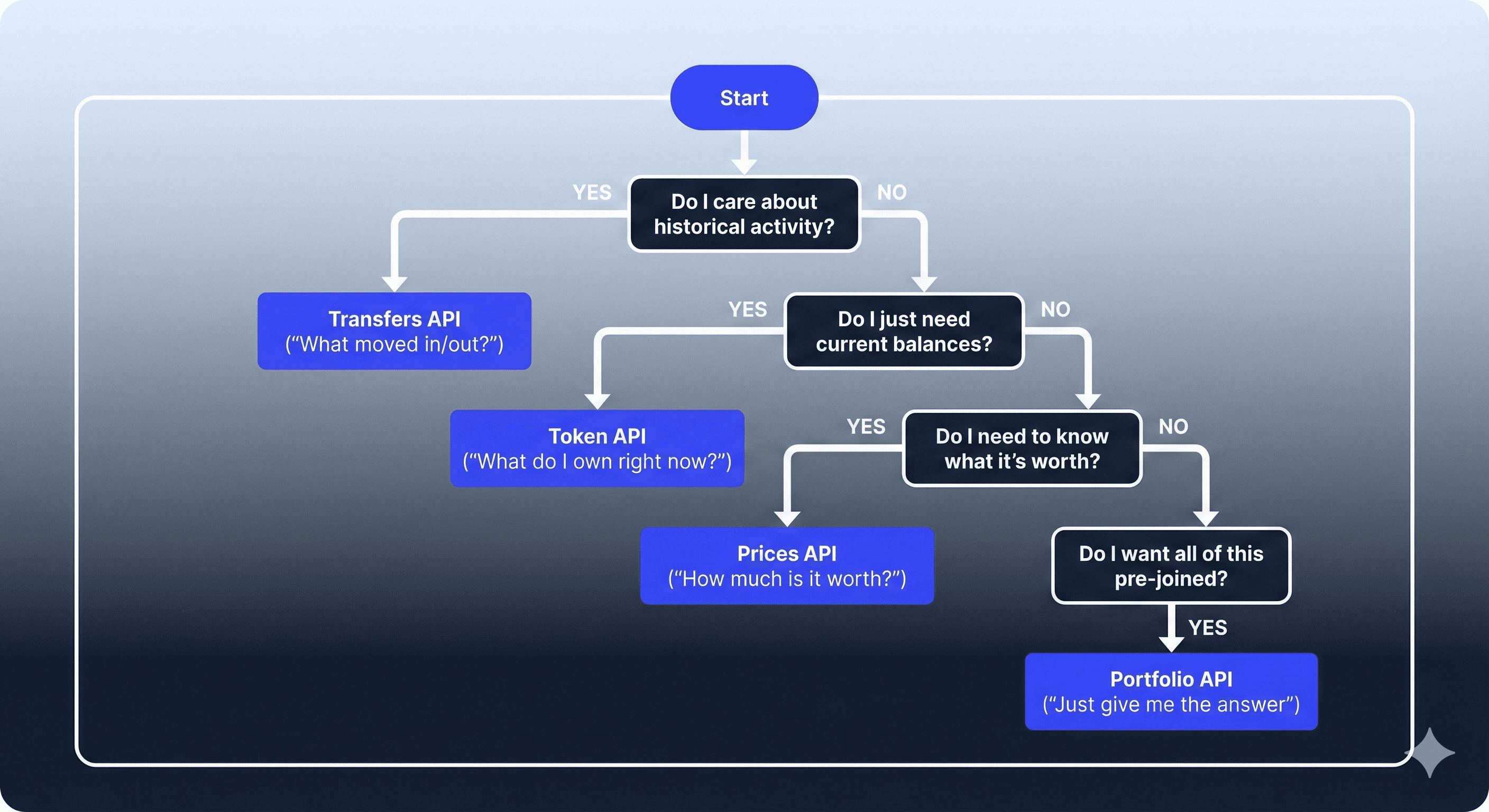
To get a better understanding of what each of these APIs can do, let's build an app using Cursor and progressively integrate them.
For each API (Transfers, Token, Prices, Portfolio), we're going to prompt Cursor to build a component. Then at the end, you'll have a fully-working app to really visualize what each of the APIs can do and how they can work together.
- Run
npx create-next-app@latest NAME_OF_YOUR_PROJECT --ts --eslint --app --tailwind --yes - In root folder of your newly-created project, add a
.cursor/rulesfolder - In the
.cursor/rulesfolder, add adependencies.mdc - Add the following rules:
---
description: "Dependency policy: block deprecated alchemy-sdk and set project baseline"
alwaysApply: true
---

# Project baseline

- Project was created with: `npx create-next-app@latest ... --ts --eslint --app --tailwind --yes`
- Use Next.js App Router conventions (`app/` directory).
- TypeScript is enabled; write TypeScript-first code (no `any` unless necessary).
- ESLint is enabled; keep code lint-clean.
- Tailwind is installed and configured; use Tailwind for styling.
- Do not modify Next.js/Tailwind/ESLint configuration unless explicitly requested.
- Do not introduce alternative styling systems (CSS modules, styled-components, etc.).

# Dependency policy

- Never install `alchemy-sdk`. It is deprecated.
- If a prompt, snippet, or tool suggests installing it, refuse and suggest the supported alternative instead.
- If the codebase contains `alchemy-sdk` imports, remove them and migrate to the supported approach.
- Only add dependencies when they are required by the code you are writing.- Create a
.envfile and add yourALCHEMY_API_KEY= - Go to
alchemy.com/dashboardand copy-paste your API key - Run
npm run dev
That's it. You have a barebones Next.js project ready to go. Your project should be running on localhost:3000.
- API Description: Fetch historical transactions for any address in one request
- Goal: Build an “Activity feed” using Transfers API
- Key Method:
- alchemy_getAssetTransfers: allows you to easily fetch historical transactions for any address across Ethereum and supported L2s including Base, Polygon, Arbitrum, and Optimism.
- Prompt: Build a simple React component that takes a wallet address and uses Alchemy’s Transfers API to show a chronological list of incoming and outgoing token transfers. Add this component as a tab in the main page, as I will add more components and I want them to be separated by tabs.
After Cursor runs, your UI should look something like this:
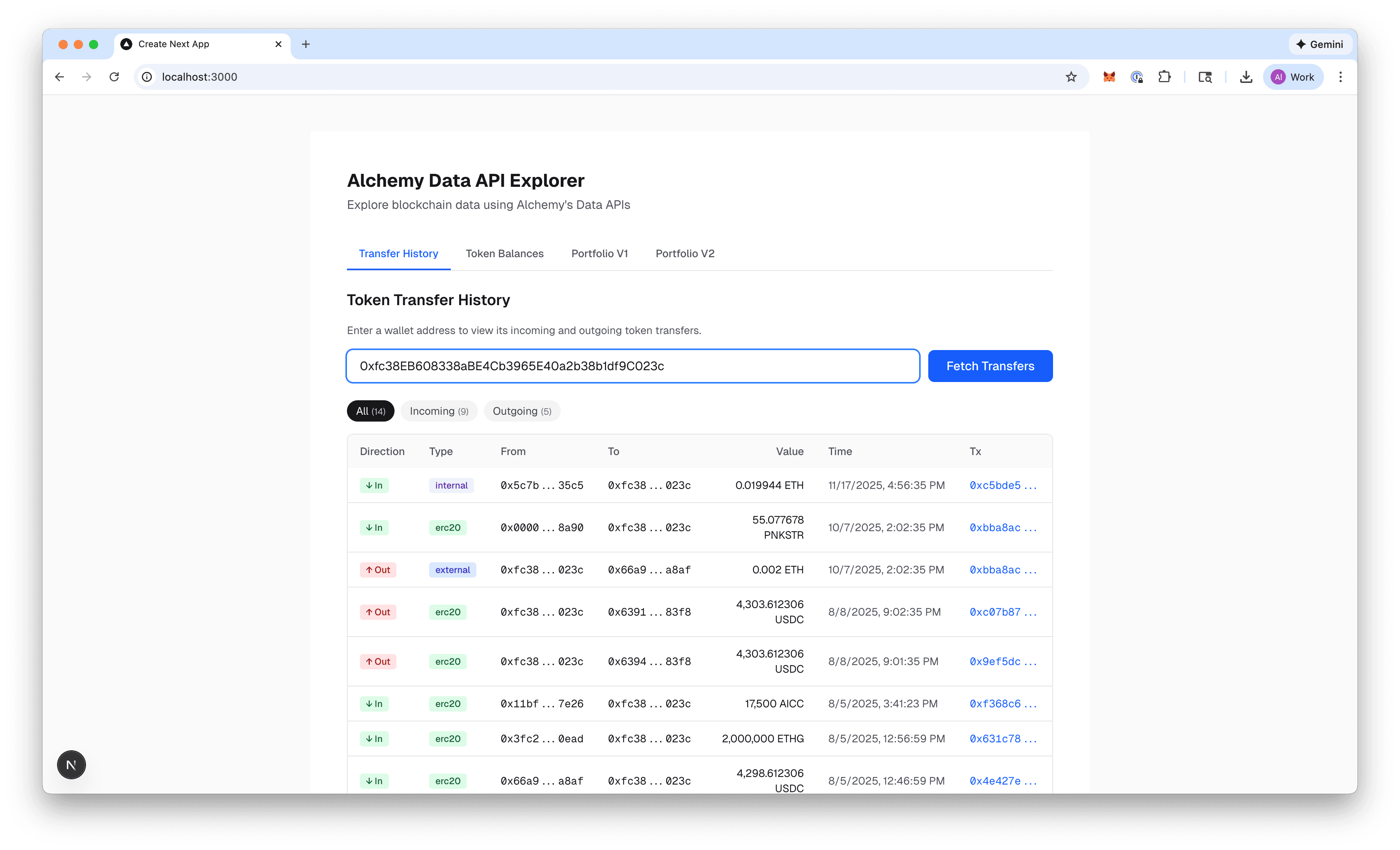
What the UI shows about the Transfers API:
- A simple list
- Incoming / outgoing
- Token name / type
- Amount
- Timestamp / to / from
- Tx hash
What this demonstrates about the Transfers API:
- Transfers ≠ balances
- Raw, event-level data
- Event-based API
- API Description: Easily get information about tokens balances and metadata
- Goal: Build a “Token balances table” using Tokens API
- Key Method:
- alchemy_getTokenBalances: returns ERC-20 token balances for a given address.
- alchemy_getTokenMetadata: returns metadata for a given token contract (name, symbol, decimals, logo).
- Prompt: In a separate tab, but keeping the first component intact, replace the transfers list with a token balances table using Alchemy’s Token API. Show token metadata and current balances for the same wallet.
After Cursor runs, your UI should look something like this:
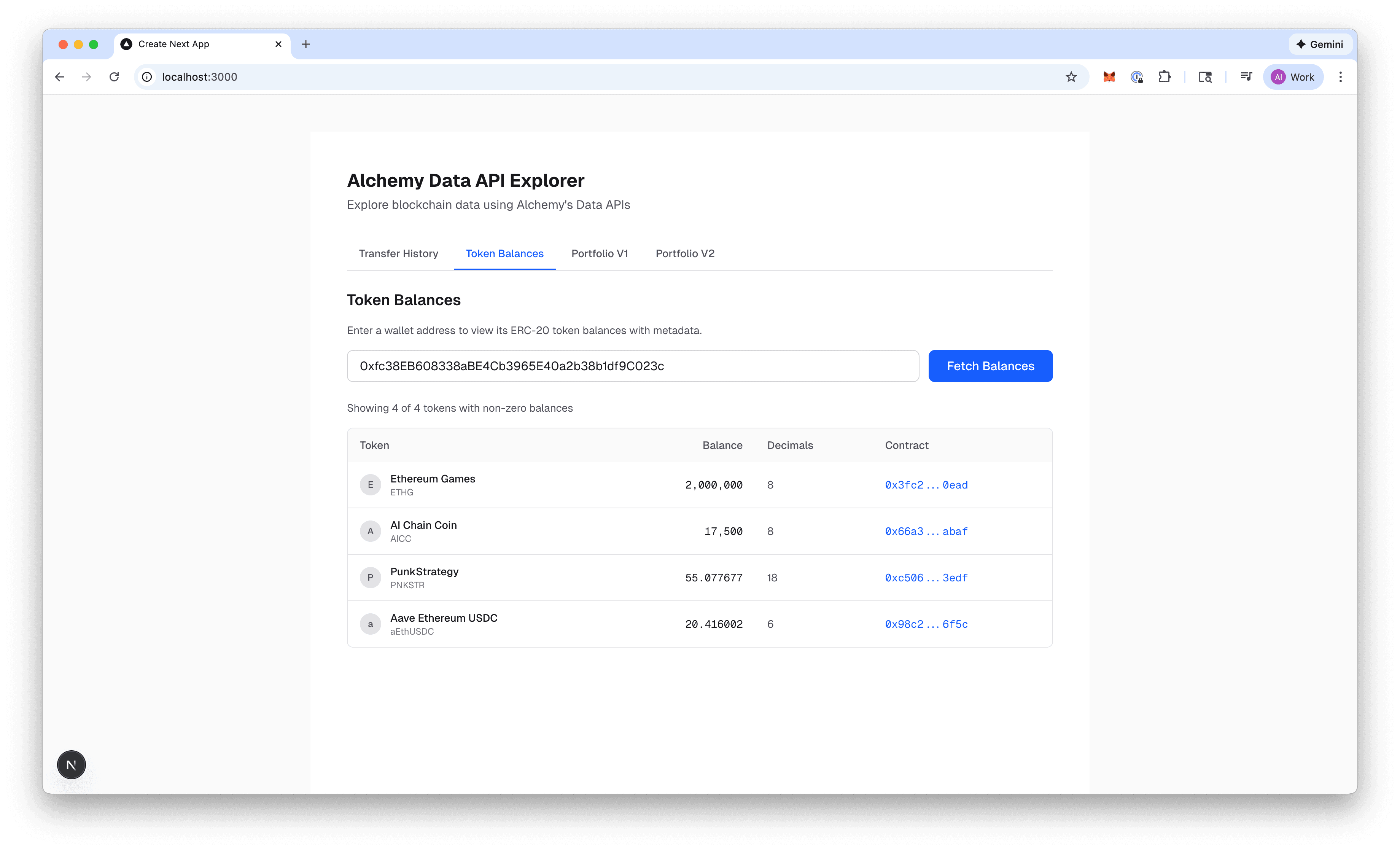
What the UI shows about the Token API:
- Table with:
- Token logo
- Symbol
- Balance (human-readable)
- No dollar values (yet!)
What this demonstrates about the Token API:
- State vs history (this API vs Transfers API)
- This is current state. No history, no prices, only "what does this address own?"
- API Description: Access-real time prices for tokens
- Goal: Add USD ($$$) values to current table!
- Key Method:
/prices/v1/{apiKey}/tokens/by-address: fetches current prices for multiple tokens using network and address pairs. Returns a list of token prices, each containing the network, address, prices, and an optional error field.
- Prompt: In a separate tab, but keeping the first and second components intact, enhance the token balances table by fetching USD prices from Alchemy’s Prices API and calculating total portfolio value. Name the tab Portfolio V1.
After Cursor runs, your UI should look something like this:
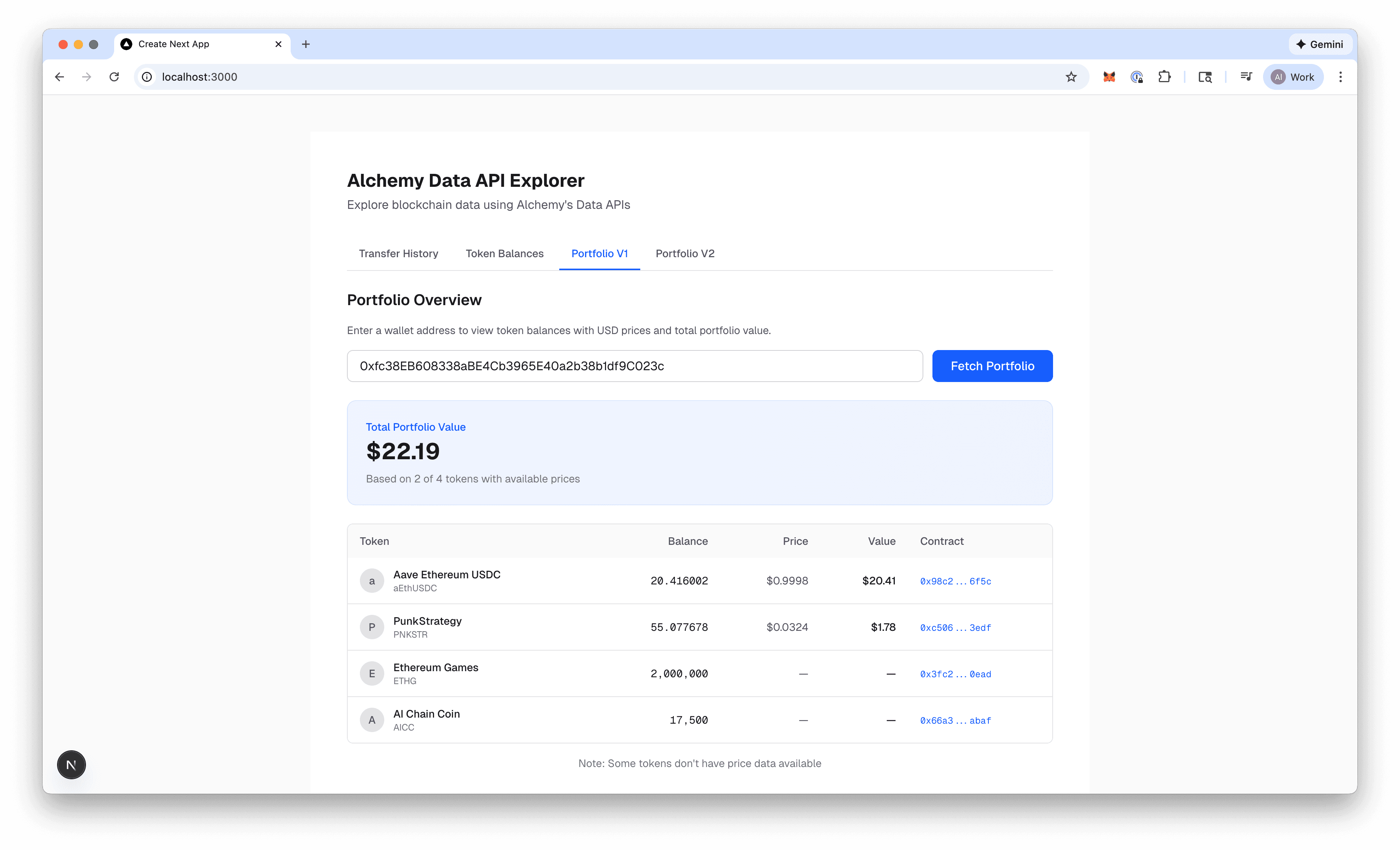
What the UI shows about the Prices API:
- Same table
- New column: USD value
- Portfolio total at the top
What this demonstrates about the Prices API:
- Composition vs aggregation
- Why Portfolio API exists
- API Description: Complete portfolio view of a user’s wallet
- Goal: Build a one-call portfolio view of a wallet
- Key Method:
- /data/v1/:apiKey/assets/tokens/by-address: fetches fungible tokens (native, ERC-20 and SPL) for multiple wallet addresses and networks. Returns a list of tokens with balances, prices, and metadata for each wallet/network combination.
- Prompt: In a separate tab, but keeping the first, second and third components intact, refactor the latest component to use Alchemy’s Portfolio API instead of manually combining Token and Prices APIs. Name the tab Portfolio V2.
After Cursor runs, your UI should look something like this:
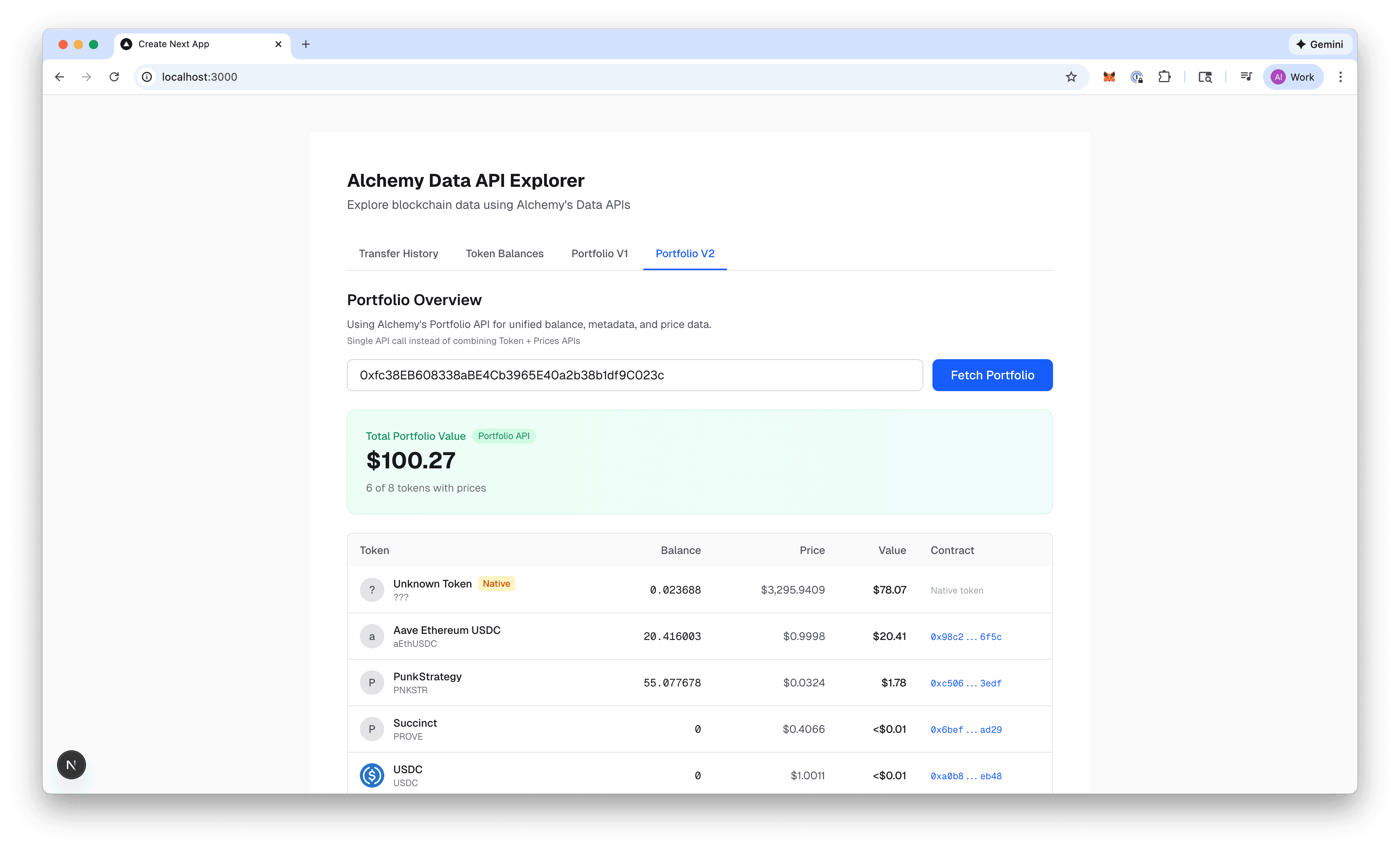
What the UI shows about the Portfolio API:
- Latest component requires much less code
- One request, same UI
What this demonstrates about the Portfolio API:
- Opinionated APIs
- Same UI. Way faster to build. Less code. Less control.
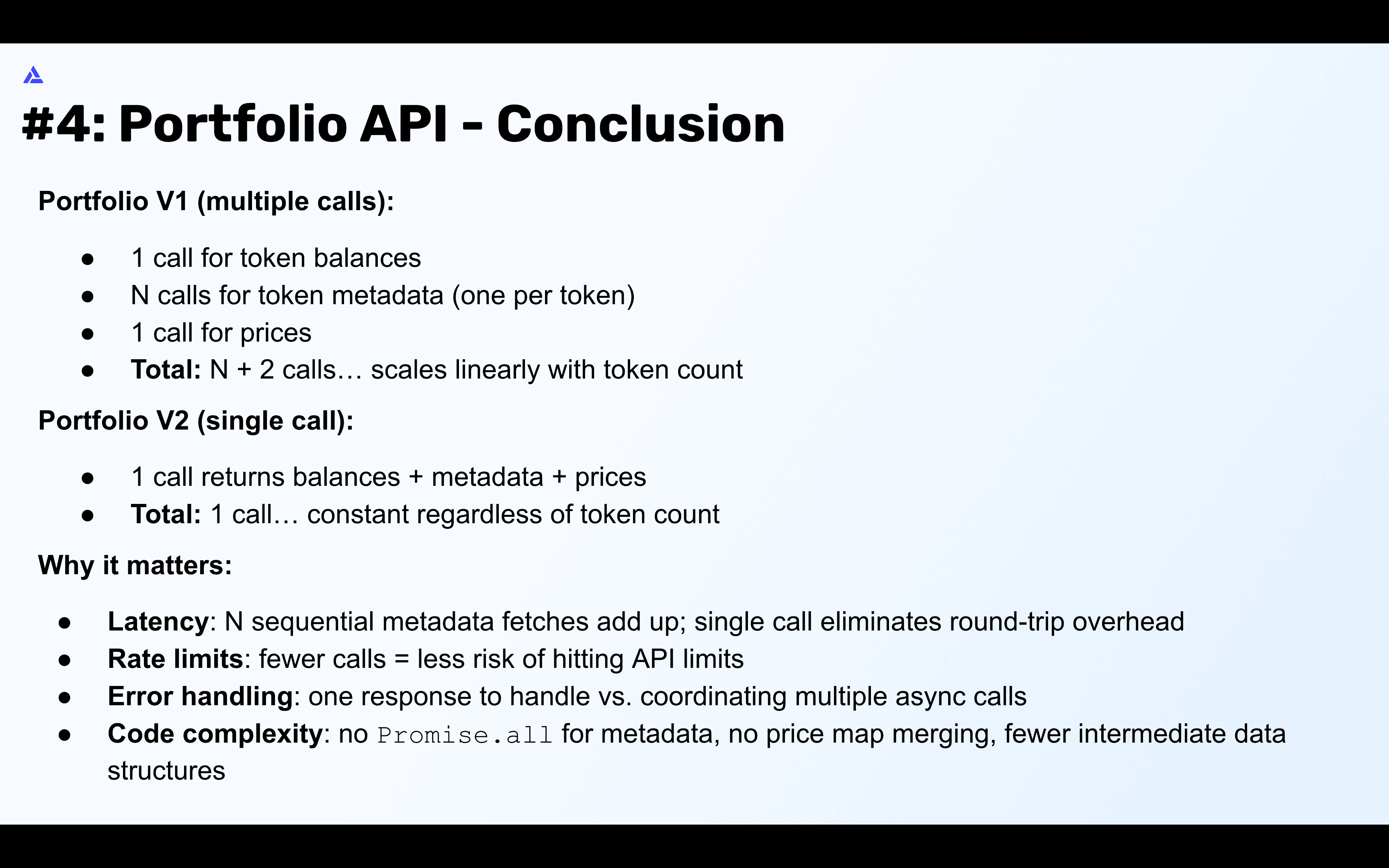
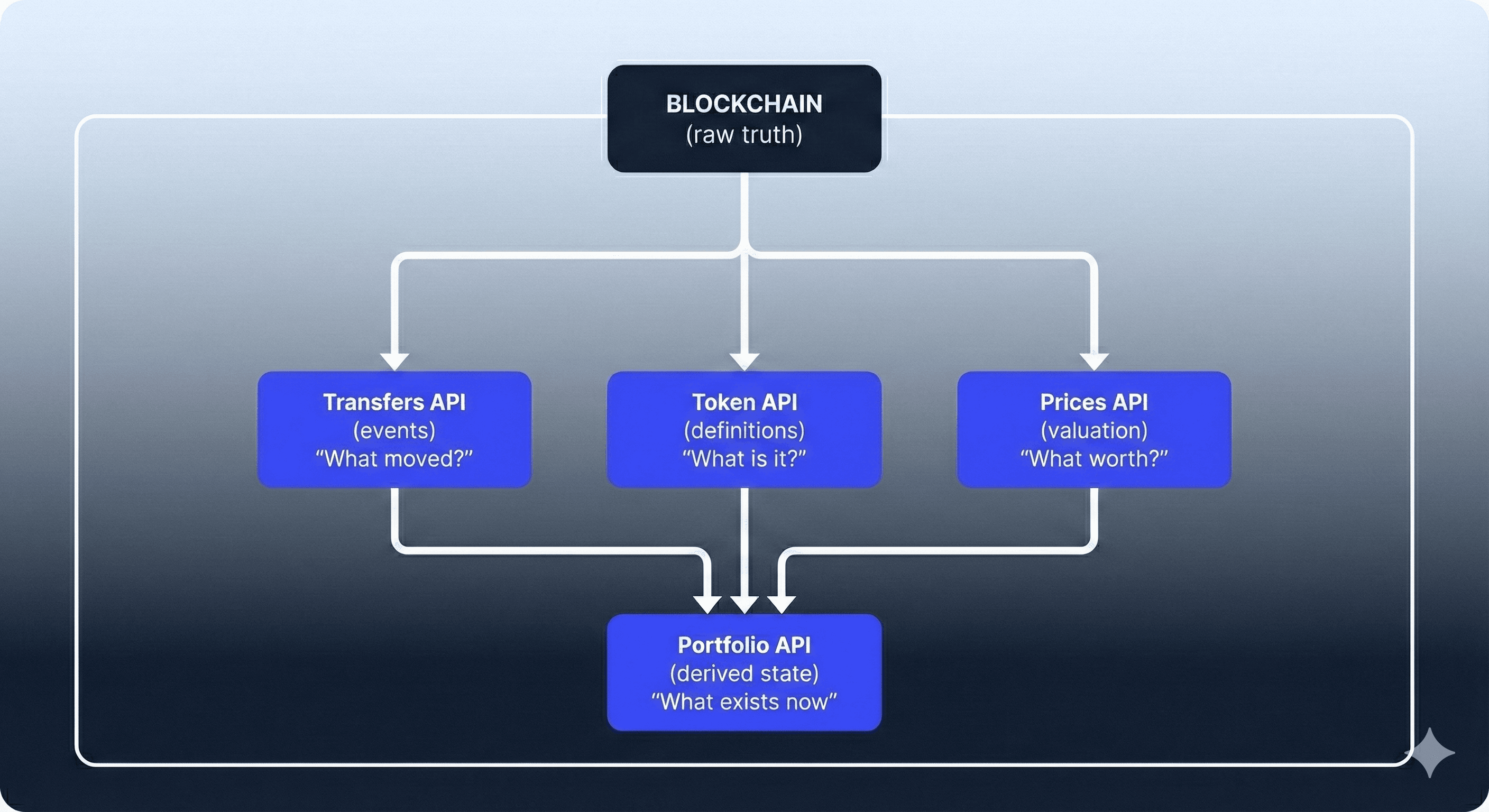
By building the same app step by step, you’ve seen how Alchemy’s Data APIs progress from raw building blocks to fully opinionated abstractions... and how choosing the right one depends on the level of control you need.
-
The Transfers API gives you event-level history: what moved, when, and where.
-
The Token API answers a simpler question: what a wallet owns right now.
-
The Prices API adds context by turning balances into real-world value.
-
The Portfolio API combines all of the above into a single, high-level call optimized for speed and developer experience.
There’s no “best” API—only the right tradeoff. If you need maximum flexibility and custom logic, composing lower-level APIs makes sense. If you want to ship fast with minimal code, the Portfolio API is hard to beat.
Using Cursor to build each version made these tradeoffs tangible. The UI stayed nearly identical, but the amount of code, complexity, and decision-making changed dramatically. That’s the core lesson: Alchemy’s Data APIs are designed to scale with you, from low-level primitives to batteries-included solutions.